TP-Link AX1800 WiFi 6 USB Adapter for – Features & Prices in Saudi Arabia :
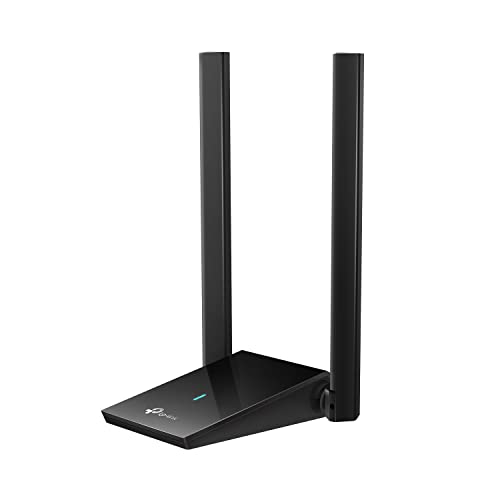
TP-Link AX1800 WiFi 6 USB Adapter for Desktop PC (Archer TX20U Plus) Wireless Network Adapter with 2.4GHz, 5GHz, High Gain Dual Band 5dBi Antenna, WPA3, Supports Windows 11/10
Brand
TP-Link
Series
Archer TX20U Plus
Item model number
Archer TX20U Plus
Operating System
Windows 11, Windows 10
Item Weight
2.88 ounces
Product Dimensions
3.31 x 6.15 x 0.76 inches
Item Dimensions LxWxH
3.31 x 6.15 x 0.76 inches
Color
Black
Manufacturer
TP-Link
ASIN
B0B5YPK9L1
Country of Origin
Vietnam
Date First Available
July 28, 2022
Test video – TP-Link AX1800 WiFi 6 USB Adapter for :
Product highlights :
Please use USB 3.0 port to ensure optimal performance
Lightning-Fast WiFi 6 Adapter -Experience faster speeds with less network congestion compared to previous generation Wi-Fi 5. AX1800 wireless speeds to meet all your gaming, downloading, and streaming needs
Dual Band USB WiFi Adapter – 2.4GHz and 5GHz bands for flexible connectivity (1201 Mbps on 5GHz and 574 Mbps on 2.4GHz)
Dual High-Gain Antennas with Beamforming: Improved range, signal quality, and transmission performance- making it your ideal WiFi adapter
Next Generation Security – This WiFi Adapter supports WPA3 encryption, the latest security protocol to provide enhanced protection in personal password safety
Adjustable, Multi-Directional Antenna: Enable flexible deployment for the best reception with adjustable antennas and flexible desktop design
Questions & Answers – TP-Link AX1800 WiFi 6 USB Adapter for :
➕ What is the price of TP-Link AX1800 WiFi 6 USB Adapter for in Saudi Arabia ?
The price of TP-Link AX1800 WiFi 6 USB Adapter for in-store is 150 SAR VAT.
➕ When TP-Link AX1800 WiFi 6 USB Adapter for was released ?
The release date was July 28, 2022.
➕ What is the price of TP-Link AX1800 WiFi 6 USB Adapter for cheap used ?
The price of TP-Link AX1800 WiFi 6 USB Adapter for used is 100 SAR VAT.
➕ What are the main characteristics of TP-Link AX1800 WiFi 6 USB Adapter for ?
Special specifications :
Please use USB 3.0 port to ensure optimal performance
➕ Is it interesting to buy this product ?
The best people who can answer you are customers who have already bought and tested this product (See Customer Reviews). This product is rated 4 / 5 on Amazon.
➕ Where to buy TP-Link AX1800 WiFi 6 USB Adapter for in Saudi Arabia ?
Technical specifications – TP-Link AX1800 WiFi 6 USB Adapter for :
Brand
TP-Link
Hardware Interface
USB, USB 3.0, USB 2.0
Operating System
Windows 11, Windows 10
Color
Black
Compatible Devices
Desktop
Item Dimensions LxWxH
3.31 x 6.15 x 0.76 inches
Data Link Protocol
USB
Data Transfer Rate
1800 Megabits Per Second
Item Weight
0.18 Pounds
Purchase advice :
Warranty :
Check the duration of the warranty and also the faults and defects it covers. Is it complete or limited? and What is included in the warranty (parts, repairs or both)?
Shipping :
Is delivery offered? And how long does it take to get delivered (Delivery time)
Proof of purchase :
Does the shop give you an invoice ?
After-sales service :
Do they have an after-sales service to have information about the installation or operation (instructions for use). Also in case of problem, it is the seller who takes charge or you must contact the manufacturer or supplier yourself.
_____________________________
16 reviews for TP-Link AX1800 WiFi 6 USB Adapter for
Rated 5 out of 5
M. O (verified owner)–
Easy to use – This took minutes to install and get working, finally got my husband’s clunker PC on the WiFi.
Rated 3 out of 5
A. K (verified owner)–
AV called onboard driver a virus – I thought the device was plug and play but does require a driver. Pretty nifty that the driver .exe is actually on the device (in Windows, you can browse to it in file explorer). My beef with the install is my antivirus flagged the driver as malicious and quarantined the file before I could do anything with it. I actually had to go to another PC and download the driver from a site (which wasn’t flagged as malicious) and install that. Kinda bummed that to install it I actually had to have a PC already online. It does work well once setup though.
Rated 5 out of 5
T. N (verified owner)–
Great, easy to set up and speedy Wi-Fi 6 adapter – This Wi-Fi adapter couldn’t have been easier to setup and use. The box is really straightforward – when you open it up, you discover the Wi-Fi unit itself and a USB 3.0 cable (with a USB 3.0 Micro connector on the unit, similar to portable hard disks, and an A connector on the other end). When you plug the adapter in to your PC, it appears as a small removable storage drive with the driver available – a really user friendly touch, given that if you’re installing a network adapter you likely don’t have an Internet connection to download drivers!
Rated 3 out of 5
I. B (verified owner)–
Doesn’t cast to TV. – No Miracast tech apparently – I bought this with the intent to stream my computer screen to a TV. This did not work. We tried every possible troubleshoot we could before I found out that Miracast technology is a thing. This doesn’t have it. So, I will admit user lack of knowledge. But, now that I know, this should be made obvious on the store page. 3 stars for poor store page info.
Rated 5 out of 5
M. O (verified owner)–
Easy to use – This took minutes to install and get working, finally got my husband’s clunker PC on the WiFi.
Rated 5 out of 5
K. T (verified owner)–
Very fast strong Wi-Fi signal – Easy to use on windows 10. Note: Had to download drivers. Long usb cable so you can position as you like for best reception. Very fast connects at 866mbps on a 5ghz channel. This is double the speed of Wi-Fi 5. Wi-Fi 6 is the way to go. It connects to the Wi-Fi much slower than my integrated Wi-Fi 5. Have actually wait a few seconds after boot. Still very satisfied with upgrade.
Rated 3 out of 5
M. I (verified owner)–
TP-Link – The damn thing only works for Windows – just so you guys know
Rated 5 out of 5
K. T (verified owner)–
Very fast strong Wi-Fi signal – Easy to use on windows 10. Note: Had to download drivers. Long usb cable so you can position as you like for best reception. Very fast connects at 866mbps on a 5ghz channel. This is double the speed of Wi-Fi 5. Wi-Fi 6 is the way to go. It connects to the Wi-Fi much slower than my integrated Wi-Fi 5. Have actually wait a few seconds after boot. Still very satisfied with upgrade.
Rated 4 out of 5
O. F (verified owner)–
Works really well when it works – When I first got this shipped to me I couldn’t get it to work in any of my USB ports. I requested a replacement and that one would only work in 1 of them. These are all USB ports known to work and that I’ve tried other wireless adapters in with no issue.
Rated 5 out of 5
S. J (verified owner)–
Worked great with my EERO Pro 6E – My internet speed is going from 300 to 600. To get ready I upgraded from an older surfboard to the S33 and my EERO Pro (wi-fi 5) to the EERO Pro 6E. After the upgrade, my Surface Book 2 was usually connecting at 150-250 down. Sadly, my upgrade made no difference. Desperate, I order the TP Link adapter.
Rated 5 out of 5
T. N (verified owner)–
Great, easy to set up and speedy Wi-Fi 6 adapter – This Wi-Fi adapter couldn’t have been easier to setup and use. The box is really straightforward – when you open it up, you discover the Wi-Fi unit itself and a USB 3.0 cable (with a USB 3.0 Micro connector on the unit, similar to portable hard disks, and an A connector on the other end). When you plug the adapter in to your PC, it appears as a small removable storage drive with the driver available – a really user friendly touch, given that if you’re installing a network adapter you likely don’t have an Internet connection to download drivers!
Rated 3 out of 5
I. B (verified owner)–
Doesn’t cast to TV. – No Miracast tech apparently – I bought this with the intent to stream my computer screen to a TV. This did not work. We tried every possible troubleshoot we could before I found out that Miracast technology is a thing. This doesn’t have it. So, I will admit user lack of knowledge. But, now that I know, this should be made obvious on the store page. 3 stars for poor store page info.
Rated 3 out of 5
A. K (verified owner)–
AV called onboard driver a virus – I thought the device was plug and play but does require a driver. Pretty nifty that the driver .exe is actually on the device (in Windows, you can browse to it in file explorer). My beef with the install is my antivirus flagged the driver as malicious and quarantined the file before I could do anything with it. I actually had to go to another PC and download the driver from a site (which wasn’t flagged as malicious) and install that. Kinda bummed that to install it I actually had to have a PC already online. It does work well once setup though.
Rated 4 out of 5
O. F (verified owner)–
Works really well when it works – When I first got this shipped to me I couldn’t get it to work in any of my USB ports. I requested a replacement and that one would only work in 1 of them. These are all USB ports known to work and that I’ve tried other wireless adapters in with no issue.
Rated 5 out of 5
S. J (verified owner)–
Worked great with my EERO Pro 6E – My internet speed is going from 300 to 600. To get ready I upgraded from an older surfboard to the S33 and my EERO Pro (wi-fi 5) to the EERO Pro 6E. After the upgrade, my Surface Book 2 was usually connecting at 150-250 down. Sadly, my upgrade made no difference. Desperate, I order the TP Link adapter.
Rated 3 out of 5
M. I (verified owner)–
TP-Link – The damn thing only works for Windows – just so you guys know
M. O (verified owner) –
Easy to use – This took minutes to install and get working, finally got my husband’s clunker PC on the WiFi.
A. K (verified owner) –
AV called onboard driver a virus – I thought the device was plug and play but does require a driver. Pretty nifty that the driver .exe is actually on the device (in Windows, you can browse to it in file explorer). My beef with the install is my antivirus flagged the driver as malicious and quarantined the file before I could do anything with it. I actually had to go to another PC and download the driver from a site (which wasn’t flagged as malicious) and install that. Kinda bummed that to install it I actually had to have a PC already online. It does work well once setup though.
T. N (verified owner) –
Great, easy to set up and speedy Wi-Fi 6 adapter – This Wi-Fi adapter couldn’t have been easier to setup and use. The box is really straightforward – when you open it up, you discover the Wi-Fi unit itself and a USB 3.0 cable (with a USB 3.0 Micro connector on the unit, similar to portable hard disks, and an A connector on the other end). When you plug the adapter in to your PC, it appears as a small removable storage drive with the driver available – a really user friendly touch, given that if you’re installing a network adapter you likely don’t have an Internet connection to download drivers!
I. B (verified owner) –
Doesn’t cast to TV. – No Miracast tech apparently – I bought this with the intent to stream my computer screen to a TV. This did not work. We tried every possible troubleshoot we could before I found out that Miracast technology is a thing. This doesn’t have it. So, I will admit user lack of knowledge. But, now that I know, this should be made obvious on the store page. 3 stars for poor store page info.
M. O (verified owner) –
Easy to use – This took minutes to install and get working, finally got my husband’s clunker PC on the WiFi.
K. T (verified owner) –
Very fast strong Wi-Fi signal – Easy to use on windows 10. Note: Had to download drivers. Long usb cable so you can position as you like for best reception. Very fast connects at 866mbps on a 5ghz channel. This is double the speed of Wi-Fi 5. Wi-Fi 6 is the way to go. It connects to the Wi-Fi much slower than my integrated Wi-Fi 5. Have actually wait a few seconds after boot. Still very satisfied with upgrade.
M. I (verified owner) –
TP-Link – The damn thing only works for Windows – just so you guys know
K. T (verified owner) –
Very fast strong Wi-Fi signal – Easy to use on windows 10. Note: Had to download drivers. Long usb cable so you can position as you like for best reception. Very fast connects at 866mbps on a 5ghz channel. This is double the speed of Wi-Fi 5. Wi-Fi 6 is the way to go. It connects to the Wi-Fi much slower than my integrated Wi-Fi 5. Have actually wait a few seconds after boot. Still very satisfied with upgrade.
O. F (verified owner) –
Works really well when it works – When I first got this shipped to me I couldn’t get it to work in any of my USB ports. I requested a replacement and that one would only work in 1 of them. These are all USB ports known to work and that I’ve tried other wireless adapters in with no issue.
S. J (verified owner) –
Worked great with my EERO Pro 6E – My internet speed is going from 300 to 600. To get ready I upgraded from an older surfboard to the S33 and my EERO Pro (wi-fi 5) to the EERO Pro 6E. After the upgrade, my Surface Book 2 was usually connecting at 150-250 down. Sadly, my upgrade made no difference. Desperate, I order the TP Link adapter.
T. N (verified owner) –
Great, easy to set up and speedy Wi-Fi 6 adapter – This Wi-Fi adapter couldn’t have been easier to setup and use. The box is really straightforward – when you open it up, you discover the Wi-Fi unit itself and a USB 3.0 cable (with a USB 3.0 Micro connector on the unit, similar to portable hard disks, and an A connector on the other end). When you plug the adapter in to your PC, it appears as a small removable storage drive with the driver available – a really user friendly touch, given that if you’re installing a network adapter you likely don’t have an Internet connection to download drivers!
I. B (verified owner) –
Doesn’t cast to TV. – No Miracast tech apparently – I bought this with the intent to stream my computer screen to a TV. This did not work. We tried every possible troubleshoot we could before I found out that Miracast technology is a thing. This doesn’t have it. So, I will admit user lack of knowledge. But, now that I know, this should be made obvious on the store page. 3 stars for poor store page info.
A. K (verified owner) –
AV called onboard driver a virus – I thought the device was plug and play but does require a driver. Pretty nifty that the driver .exe is actually on the device (in Windows, you can browse to it in file explorer). My beef with the install is my antivirus flagged the driver as malicious and quarantined the file before I could do anything with it. I actually had to go to another PC and download the driver from a site (which wasn’t flagged as malicious) and install that. Kinda bummed that to install it I actually had to have a PC already online. It does work well once setup though.
O. F (verified owner) –
Works really well when it works – When I first got this shipped to me I couldn’t get it to work in any of my USB ports. I requested a replacement and that one would only work in 1 of them. These are all USB ports known to work and that I’ve tried other wireless adapters in with no issue.
S. J (verified owner) –
Worked great with my EERO Pro 6E – My internet speed is going from 300 to 600. To get ready I upgraded from an older surfboard to the S33 and my EERO Pro (wi-fi 5) to the EERO Pro 6E. After the upgrade, my Surface Book 2 was usually connecting at 150-250 down. Sadly, my upgrade made no difference. Desperate, I order the TP Link adapter.
M. I (verified owner) –
TP-Link – The damn thing only works for Windows – just so you guys know